 Search
 Member List
 Calendar
 Help
 VoIP Call Provider - Discussion Forums for the VoIP Call Provider
 VoIP Call Provider MarketPlace
Sell VoIP Routes
 Securing Security Options
|
Securing Security Options
|
|
06-07-2014, 12:44 AM,
|
|||
|
|||
|
Securing Security Options
Preface: I thought about making a separate page for each one of the settings I will be dealing with in this section of the Group Policy Management Console but instead, I've decided to put them into one page. If you do not want to mess with a particular setting, pressing the "next section" link will automatically bring you down to the next section. Method: Click Start then Run.. 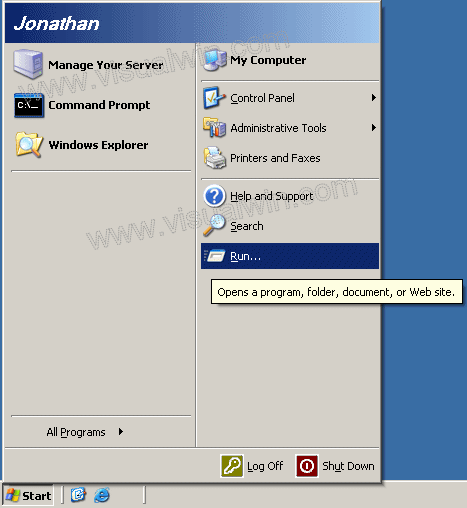 In the Run box type "gpedit.msc" 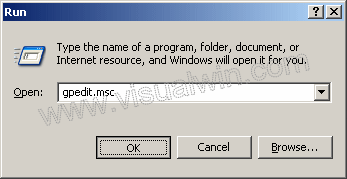 Under Computer Configuration Click the + next to Windows Settings, then Security Settings, Local Policies then click on Security options Since we have already created a secondary administrator in the New User tutorial you may not want Administrator account enabled, therefore, we have the option to disable it. This may cause problems, so instead of disabling it, you may just want to make a really secure password (that you still remember!) for it and not use it. Double click Accounts: Administrator account status and set the radio button to Disabled  If you are worried about people seeing the user name of the last person logged in (at the Ctrl-ALT-DEL log in screen) then you can disable the showing. Double click Interactive Logon: Do not display last user name. Set the radio button to Enabled  [center]Setting a message to show up in a dialog box after users press Ctrl-ALT-DEL at the log-in screen (next section)[/center] Double click Interactive Logon: Message text for users attempting to logon. Type in the message you want displayed and press OK [center]Setting a title for the log-in message[/center] Well, we have the message text to show up after pressing Ctrl-ALT-DEL at log-in. How about we set up a title to go with that. Double click Interactive Logon: Message title for users attempting to logon. Now type in what you want to display at the title bar  That's all! Feel free to look around the other settings in this tree if you are curious. Most of the other settings are secure already.
fasily2k, proud to be a member of VoIP Call Provider - Discussion Forums for the VoIP Call Provider since Jan 2014.
|
|||


|
« Next Oldest | Next Newest »
|
