 Search
 Member List
 Calendar
 Help
 VoIP Call Provider - Discussion Forums for the VoIP Call Provider
 VoIP Call Provider MarketPlace
Sell VoIP Routes
 Finding your new hard drive (assigning letters)
|
Finding your new hard drive (assigning letters)
|
|
09-07-2014, 04:19 PM,
|
|||
|
|||
|
Finding your new hard drive (assigning letters)
Preface: Many people have 2 or more hard drives in their computers, then after the installation they load "My Computer" and to their surprise the hard drives aren't there! This tutorial helps you find out that your hard drive is OK and will assign a drive letter, so you can access it in "My Computer" Method: Start -> Run... Type "compmgmt.msc" (without the quotes) Under "Storage" click on "Disk Management" and while it is loading you will see When it's done loading you should see something like the following 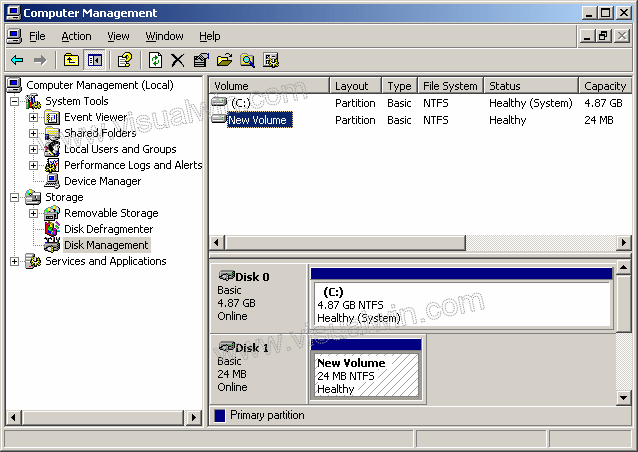 There it is! That's the drive's partition we've been looking for! Right click it, and click "Change Drive Letters and Paths..." 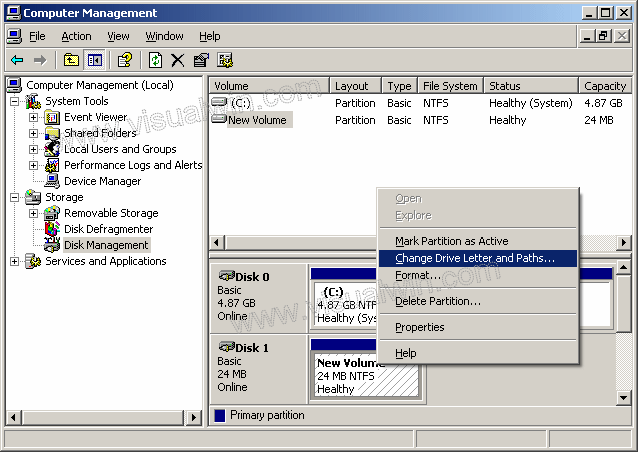 In the new dialog box you'll see and empty list box - that's where our drive letter will be. So Click the Add button 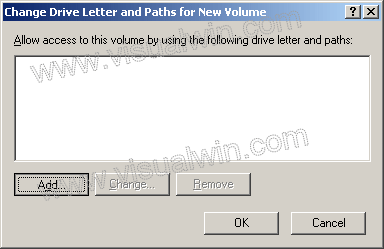 You now have the option of either making this hard drive show up in place of an empty folder on another NTFS drive (like if C:\imbored is an empty folder, we can mount the drive there, and all the contents of the drive will show up in C:\imbored) but in this tutorial we will use a drive letter, in my case, E: 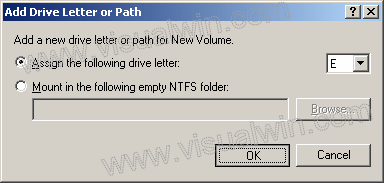 Now you can close Computer Management and load "My Computer". You'll see that our new drive is now there!
fasily2k, proud to be a member of VoIP Call Provider - Discussion Forums for the VoIP Call Provider since Jan 2014.
|
|||


|
« Next Oldest | Next Newest »
|
