 Search
 Member List
 Calendar
 Help
 VoIP Call Provider - Discussion Forums for the VoIP Call Provider
 VoIP Call Provider MarketPlace
Sell VoIP Routes
 Setting up the usage of DirectX and graphics acceleration on Windows Server 2003
|
Setting up the usage of DirectX and graphics acceleration on Windows Server 2003
|
|
13-07-2014, 04:15 PM,
|
|||
|
|||
|
Setting up the usage of DirectX and graphics acceleration on Windows Server 2003
Preface: You should NOT enable DirectX and Graphic Acceleration on this OS. It is a server, and is meant to be used as one. Method: Right-click on your desktop and select Properties  Go to the Settings tab and click Advanced 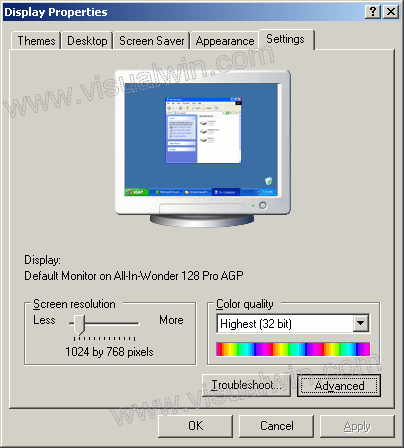 Go to the Troubleshoot tab and move the slider to Full 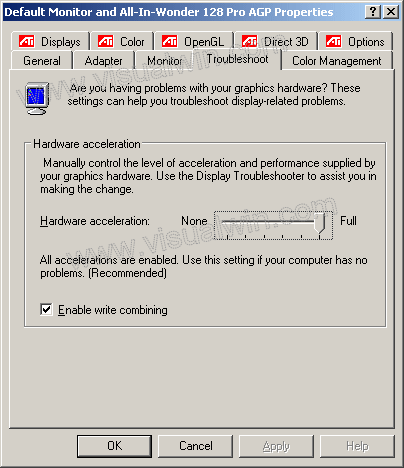 Press OK and OK. Now go to Start->Run... and type dxdiag, after a little wait the progress indicator should disappear. Now go to the Display tab and make sure the 3 DirectX features are Enabled 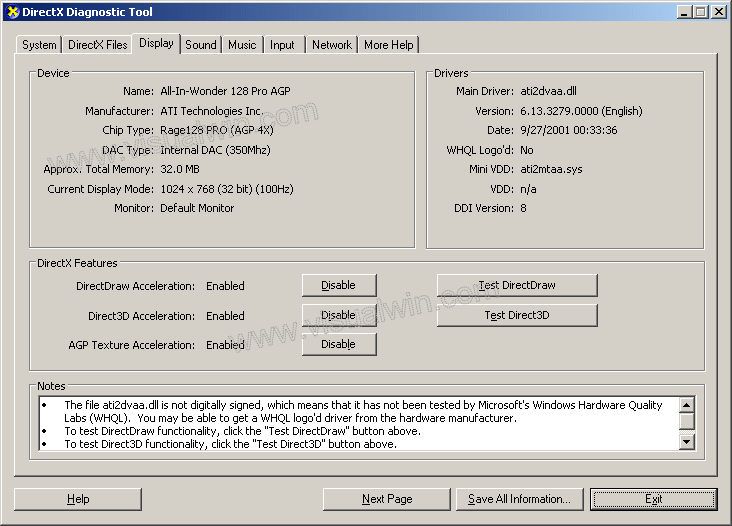 You've just enabled DirectX and Graphics Acceleration
fasily2k, proud to be a member of VoIP Call Provider - Discussion Forums for the VoIP Call Provider since Jan 2014.
|
|||


|
« Next Oldest | Next Newest »
|
